Now you can enjoy all the features of Skeleton at no cost for 14 days. During this trial period, you’ll be able to explore all the tools and features we offer and see for yourself how Skeleton can enhance your work.
What happens after the 14-day trial?
At the end of the 14-day free trial, you will have the option to purchase a license to continue using the tool, or you can keep using the free version for as long as you like. The choice is yours!
How to activate the 14-day trial?
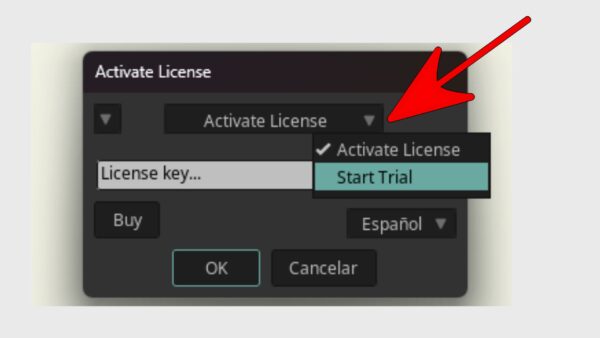
1. Click the drop-down menu, as shown in the image.
2. Select the option “Start trial”. The system will check your device’s date.
* If the date is incorrect, set it properly before continuing.
3. Once everything is correct, click “OK”.
Done! Your 14-day trial will be activated with all tools unlocked.
Log in or register to download for free
Login
Register
To purchase this product, you must first purchase the "Skeleton" product.